 CREATED BY BRAINCREATIVES I.T.
CREATED BY BRAINCREATIVES I.T.
CREATED BY BRAINCREATIVES I.T.
100+ features. AI-powered workflows. Real-time staging. Enterprise licensing. Three beautiful themes. All in a single Windows desktop app.
Generate conventional commit messages (feat/fix/refactor) from your diffs using Claude or OpenAI. One click.
Identify bugs, security issues, and performance concerns. Get actionable feedback before you push.
Understand any commit in plain language. Perfect for onboarding or reviewing unfamiliar code.
Auto-generate professional Pull Request descriptions with summary, changes, and testing steps.
Line-by-line code annotations with severity levels — errors, warnings, and suggestions inline.
Onboard to any codebase instantly. AI analyzes file tree, README, and recent commits to explain the project.
Create, delete, rename, checkout. Drag-and-drop branch merge. Full local and remote branch management.
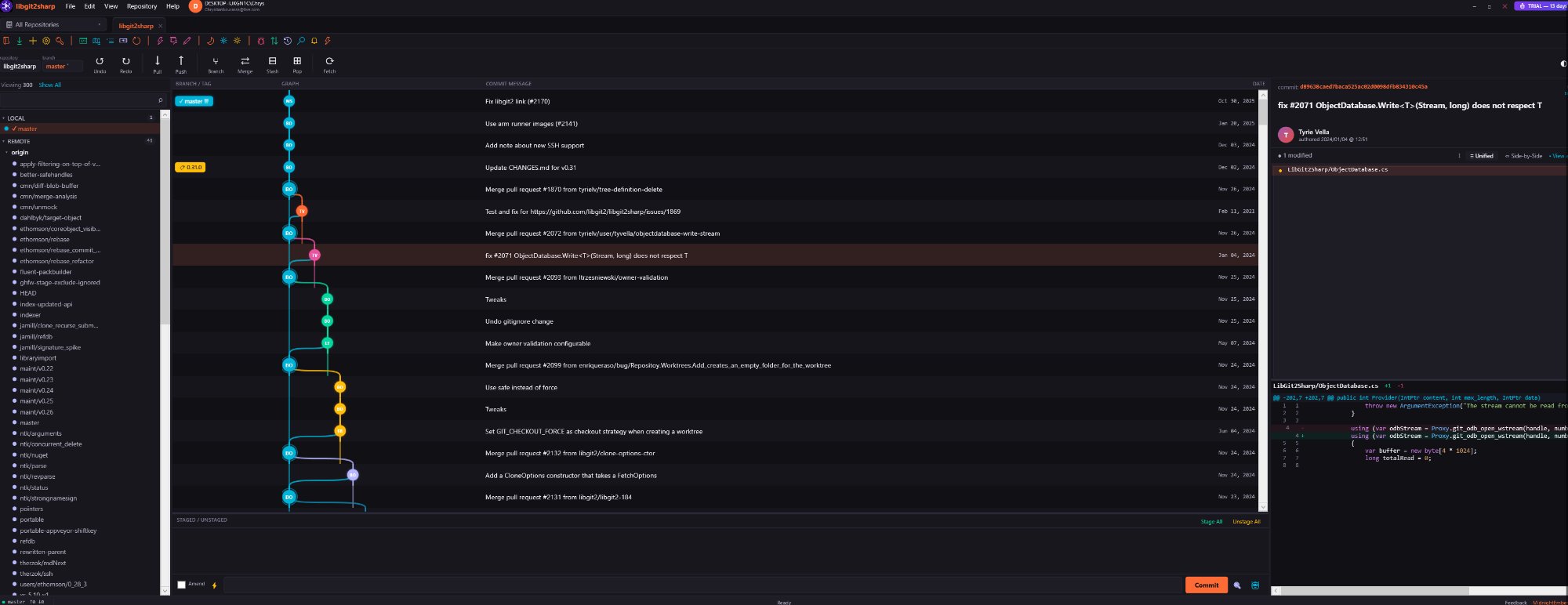
Beautiful branch visualization with merge lines, tag markers, and branch labels. Up to 300 commits rendered.
FileSystemWatcher detects changes instantly. Save a file, see it staged. No manual refresh needed.
Dedicated rebase window with pick/squash/reword. Visualize commit order before executing.
Full conflict resolution window — ours, theirs, ancestor views. Keep ours, keep theirs, or edit manually.
Cherry-pick any commit. Revert commits cleanly. Reset (soft, mixed, hard) with undo safety net.
Save, pop, apply, drop stashes with full UI. Never lose work-in-progress changes.
Lightweight and annotated tags. Create, delete, checkout. Full tag listing with messages and dates.
Start/finish features, releases, hotfixes. Automatic branch creation, merge, tag, and cleanup.
30+ languages auto-detected. Keywords, strings, comments, numbers, types — all color-coded in diffs.
Stage individual hunks or specific lines. Partial staging gives surgical control over your commits.
See who wrote every line, when, and in which commit. Dedicated blame window with highlighting.
Track every change to any file across the entire repository. Dedicated file history window.
Side-by-side visual comparison for PNG, JPG, GIF, SVG, WebP, BMP, and ICO file changes.
Visual overview of your repository structure. Navigate code architecture with the code map panel.
MidnightEmber, Dark, and Light. Every window, dialog, toast, and panel respects your chosen theme.
Organize repos into named workspaces with custom colors and icons. Batch fetch/pull/push all repos.
Open multiple repos in tabs. Pin tabs. Each tab has its own independent Git context.
Ctrl+K fuzzy search for any command. Quick access to every feature without touching the mouse.
Built-in terminal panel with saved command snippets. Run git commands directly inside NeuroGit.
Beautiful animated toasts — success, error, warning, info. Slide-in animation with history tracking.
Drop folders to open repos. Drag branches to merge. Intuitive drag interactions throughout the app.
Remembers position, size, sidebar widths, and maximized state across sessions.
Strip away distractions. Focus mode hides secondary panels for a clean, minimal workspace.
Search by SHA, message, author, email across 2000+ commits. Instant fuzzy matching.
Filter commits by author, branch, date range, and file path. Multi-criteria real-time search.
50-level undo stack for git operations. Redo support. Reflog browser for full history recovery.
Select multiple commits and squash into a single clean commit with a new message.
Multiple working directories from one repo. Add, remove, and switch between worktrees.
Before merging, predict which files will conflict by analyzing overlapping changes between branches.
Compare any two branches side-by-side. See divergence, ahead/behind, and conflicting files.
Pre-configured: feat, fix, docs, refactor, test, chore. Fully customizable in settings.
Export your commit log to CSV or Markdown. Perfect for reports and documentation.
One-click browser login. Full repo access, PR creation, issue tracking via Octokit SDK.
Native GitLab authentication with API scope. Push, pull, and manage repos seamlessly.
Full Bitbucket integration with OAuth2 token exchange and automatic credential management.
Login with Google for identity verification. OAuth2 with local HTTP callback listener.
Send commit/push events to Slack, Discord, and Microsoft Teams via webhooks.
Custom URL protocol handler. Open repos, branches, or commits from any link or script.
4-tier: Free, Pro, Teams, Enterprise. Offline key validation with machine-ID binding.
Auto-starts on first launch. Full Pro features unlocked. No credit card required.
Enable/disable GPG signing. Configure signing key. Full GPG support via git CLI.
GitHub Actions and commit status checks displayed inline. Build pass/fail at a glance.
List, create, review PRs from within NeuroGit. Full GitHub Octokit integration.
Track, untrack, manage LFS patterns. View LFS status. Full large file storage GUI.
Daily rotation, session tracking, error counts, performance metrics, 14-day auto-cleanup.
Checks neurogit.runasp.net for new versions. Download prompt with release notes.
Full reports — session, OS, .NET version, errors, memory, log files. One-click export.
A-F grade: stale branches, large files, missing .gitignore/README, uncommitted changes, unsigned commits.
15 achievements (First Commit → Legendary). Daily streaks. Track commits, pushes, merges, conflicts.
GitHub-style 52-week commit activity heatmap built right into the app.
Total commits, contributors, language breakdown, commits/month, repo size, top contributors.
Visual editor for 8 hooks: pre-commit, commit-msg, post-commit, pre-push, and more.
Add, view, remove notes on any commit. Context that lives alongside your history.
Full English and French localization. Every menu, label, dialog translated.
Author avatars auto-loaded from Gravatar by email. Cached for fast display.
Visual .gitignore editor built-in. Add patterns, preview ignored files, save directly.
Configurable background fetch (1-60 min intervals). Stay synced without thinking about it.
List and update submodules. View name, path, URL, HEAD SHA for each.
Bookmark important commits for quick access. Custom branch colors for visual org.
SSH key path config, PAT validation, credential persistence with remember-me.
Neural network animation with startup sound. Professional first impression every launch.
Minimize to system tray with balloon notifications. Runs quietly in the background.
First-launch setup: name, email, theme, AI keys, auth. Productive in 60 seconds.
Remove all untracked files with one click. Discard individual files or everything.
Quick-access list of your 10 most recent repositories. Always up to date.
Feb 22, 2026~18 MBWindows 10/11 x64GET https://neurogit.runasp.net/api/version.json { "version": "2.0.0", "releaseDate": "2026-02-22", "downloadUrl": "https://neurogit.runasp.net/downloads/NeuroGit-2.0.0.zip", "releaseNotes": "NeuroGit v2.0 — Enterprise Edition...", "mandatory": false }
100+ features. One download. Zero configuration.